
 My Account
 Cart (
 (
(10/03/2020
- How can I extend a term license?
- Can I change a single licence for portable (USB) licence?
- How can I install a single licence?
- What is a term licence?
- I have lost (destroyed) the pendrive used to install the licence. What should I do?
- Can I change a single licence for portable (USB) licence?
- Why is it necessary to wait 24 hours to move the single licence from one computer to another?
- How to move the single licence from one computer to another?
- Can I install a single licence on a server?
- On how many computers can I install a single licence?
- I have lost (destroyed) the pendrive used to install the licence. What should I do?
- Do I need to have my own pendrive to install the software?
- What is the function of a pendrive in a portable (USB) licence?
- What do I need to install and activate a portable (USB) licence?
- Can I use a portabale USB licence on more than one computer at the same time?
- Problems with retaining the current position arrow and compass
- How to display a map from DXF file
- Measurement setup – antenna height, count of epochs, point name and code, etc.
- How to display an online map from WMS, WMTS, TMS, Google Maps or Open Street Map services
- Connection of the GNSS receiver with the QuickGNSS app
NTRIP setup
|
Select NTRIP SETTINGS ... on the HARDWARE tab.
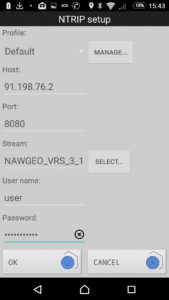 NOTE: You need to have continuous internet access on your Android device to configure the connection to reference station systems.
Profile - a list of predefined profiles containing all the following parameters of connections with reference station systems. Click MANAGE ... to add, delete or edit profiles.
Host - IP address of the selected reference station system
Port - port number for accessing the appropriate set of corrections
Stream - a list of available; use SELECT ... to find mountpoints or enter the name of mountpoint.
User name - the user’s login set during registration in the reference station system.
Password - the user's password set during registration in the reference station system.
NOTE: You need to have continuous internet access on your Android device to configure the connection to reference station systems.
Profile - a list of predefined profiles containing all the following parameters of connections with reference station systems. Click MANAGE ... to add, delete or edit profiles.
Host - IP address of the selected reference station system
Port - port number for accessing the appropriate set of corrections
Stream - a list of available; use SELECT ... to find mountpoints or enter the name of mountpoint.
User name - the user’s login set during registration in the reference station system.
Password - the user's password set during registration in the reference station system.